Notification

SBI ASSOCIATE BANK PO EXAM NOTIFICATION, ANY HELP MAIL ME ON djdinajp@gmail.com

Oct 4, 2012

State Bank of India Planning To Fill 20000 Vacancies Soon


next sbi recruitment 2012 2013Ask about jobs in public sector banks and State bank of India will be the most favored organization to work among young people.It is proven on many occasions when lacs of fresh graduates apply for sbi recruitments every year.The selection process for PO & clerk cadre has undergone massive changes with IBPS conducting a common written exam.But SBI still remains the top choice for majority.

State bank group along with its 5 associates have a combined presence of 16,000 branches across the nation making it the no.1 bank in terms of size.

A recent article in businessline will provide answers to all those asking ‘What are the upcoming SBI vacancies’

20,000 jobs in SBI for grabs

Mr. A.Krishna Kumar, Managing director says,
“SBI is looking to recruit 19000 clerks & 1000 probationary officers within the next one year”
The bank already has staff strength of 2.15 lac employees which is 7400 lower than the previous FY. As of June, the entire workforce numbers stand as below:
  • Officers – 80,404
  • Clerks - 95,018
The total staff in SBI over the years are shown by way of chart
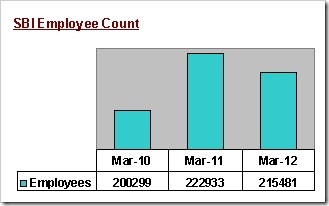
total no. of sbi employees,jobs in sbi,sbi recruitments in 2013,when is the next sbi clerk recruitment,how many clerks are there in SBI 

Manpower for new branches

What is pushing the state bank group to increase its headcount at an such an aggressive pace? Following are the reasons

Retirements:This is one of the main issues faced by all govt. owned banks & state bank of India is no exception.Around 80,000 current employees will be retiring in next 5 years, says the MD.

Expansions: As on June 2012, SBI has 14127 branches. To maintain its dominant position, the banking major is to add 1200 branches (with atleast 700 in urban/metro areas) this year & new recruits will be needed for these locations.

Notification soon

When will be the next sbi clerk recruitment? could be your next question & we can hear you asking it.

The interview process for 9500 clerks & stenographers are currently underway. Once its completed, the process for PO recruitments shall begin, remarks SBI`s group executive of national banking

Some candidates are of the view that the bank has increased the no. of vacancies for the ongoing recruitment itself but we were not able to confirm it with any officials.

So If additional posts are not created in the above exercise, official notice for new SBI clerk jobs can be expected in Jan/ February 2013

11000 clerks in 2009!

State bank of India has been the single largest job creator in this sector for past few years.The response for their hirings is itself enough to understand the dreams of aspirants.

In 2009, an announcement for SBI recruitment of 11000 clerks was made. Do you know how many people expressed interest?

Nearly 36 lakh applications were received for written exams that were held for just 11000 posts. (see over 30 lakhs want job in SBI)

Ready?
With demand for bank jobs especially in public sector on the rise, any SBI clerk recruitments in 2012 -2013 will only see more no. of registrations than previous years.

So are you ready for the competition?

Top 8 Questions You Should Prepare For Bank Interviews


bank interview room,latest bank interview questions,sure interview questions and how to answer themCommon banking test may be a one time exercise but the selection gets over only after each bank completes its interview proceedings.So candidates have to prepare for every bank interview just like preparing for exams earlier.It is not always easy to read the minds of panelists. 

Due to this personal interview sessions always tend to create panic among young people.But by being bold & ready to encounter any type of question with confidence, it is possible to keep fear at bay.

Procedure & Marks

From the applications received, candidates will be shortlisted for interview stage based on their CWE scores and no. of vacancies.

It shall be conducted for 100 or 50 marks & the minimum marks to qualify for final selection shall be 40-50%. But for you to compete with others, securing the max. score is important, which can be attained by proper preparations.

What to Prepare

Although, predicting exact questions is not possible, there are certain topics that are sureto be touched by the panelists during an interview for bank posts. 
1. Personal details
This will be the first section wherein you are asked about your family, education etc., Normally the question is like ‘Tell us about yourself’.

Start with a short introduction about family background & move on to highlight your skills & achievements or college projects. (checkout how to answer tell me about yourself)

2. Study your resume/ biodata
The biodata or resume carries great importance as its the official document about you. As bulk of the questions would revolve around the data you provide, pay attention while filling the form given at the interview venue.

Get familiar with what you have written so as to avoid giving wrong answers.

3. Banking knowledge
Applying for a bank job & don't know what is a term loan?The chances of you making it to the final list would only get distant.There are roughly about 100-130 regularly used words in banking & financial sector.

There is no alternative apart from memorizing those terminologies but it isn't that hard since banking awareness is a section of the common bank exam.

Rather than relying only on websites,you can also purchase some books that provides detailed explanations.

4. Latest news
‘What is the current repo rate’, ‘Who is the chief of Asian development bank’ – answersnewspapers for interviewsto these would be known only if you read newspapers everyday.

Not limited only to economy, you could also encounterquestions about national events such as the recent satellite launch, location of asia`s largest solar parketc.,

G.K books may help for historical data but newspapers & news channels are your only source for latest happenings.

5. Know your state
Public banks are now demanding applicants for clerical posts to posses proficiency in local language of the state.

In addition to testing your language skills, expect queries on the no. of districts in your state, names of ministers,governor or about a place of importance.

These questions need not necessarily test your knowledge but enables the interviewer to deduce your communication skills.

6. Know about the organization
Few questions on history, performance, awards or chairman/MD of the bank could be asked to gauge your level of preparation & interest in taking up the job.

Visit the bank`s website, look for a section ‘About us’ under which all the info ranging from mission, vision to previous year`s financial results will be available.

7. Know yourself
Now comes the real part, where you need to talk more.What could you be questioned on?
  • What are your strengths & weaknesses?
  • What is your biggest achievement?
  • How can you be useful to our bank?
Answering these can get tough if you have not though about this in advance.

Responses like ‘My biggest strength is working hard’ & ‘Short temper is my weakness’ will only send wrong signals to the interviewing panel.Don't sound too vague or object of ridicule.

While officer post requires managerial & team building skills, clerical employees are required to have good customer handling capabilities.

Understand the job profile & frame answers that could bring these qualities to the fore.

8. Why bank job?
Are you applying for entry level posts in banks with BE/MBA/MCA degrees? If yes, either of the following questions could be heading your way
  • Why are you applying for banks with technical degree
  • Are`nt you overqualified for PO/ clerk position
The best answer here shall be the real reason which pushed you to write CWE & apply for bank jobs.Try to come up with a reply that would convince the panel.

Checkout our previous post - How to answer why you chose bank jobs to read on what to say in detail.

These are the 8 sure shot questions that you need to prepare for cracking the next bank interview!!

Convert From XPS To PDF Online And Offline Software Converters


Microsoft Corporation is said to be the creator of a lot of document formats including .docx, .pptx, .xps, etc. All of these document formats are meant to be opened by their respective viewer, but we know better that we can view and edit almost all of the office supported formats in free software like Open Office. The thing is not many people uses all of these document formats. So people tend to move towards file format converters like the ones I’m going to share.
Like I said, not many people view files in XPS (Open XML Paper Specification) viewer nor do they really use this document format, but we do need XPS viewer and editor if we are working on a fixed structured/layout document based on XML (Extensive Markup Language). When we talk about converting file formats just for the aspect of viewing we generally tend to convert file formats to PDF (Portable Document Format).
I’ll give the names of some online and offline tools that converts XPS file format to PDF format for free.

Online Tools

As the name suggests, Convert.Files lets you convert any document file in any format to your desired format. All you have to do is upload your file from the browse option. In the input format choose XPS and in the Output format choose PDF and then click Convert.
XPS To PDF is another online XPS to PDF converter, which lets you convert XPS documents to PDF documents online for free. It even shows you how to convert XPS to PDF using XPS Viewer and Bullzip PDF printer.

Offline Tool

CheckPrixa XPS To PDF converter is one of the widely used converters because of it’s batch conversion support. All you have to do is install this free application from their website and choose your file for conversion. You can even convert multiple files at once. It is a very handy tool.

Combine Word Documets Without Any Software in MS Office / Open Office


To combine more than one Word Documents into one, what we do is copy and paste. In case we want to merge multiple documents into one quickly, MS Word itself provides a feature to do that. It works in Microsoft Word 2007, 2010 and also in MS Office 2013.

How To Combine Multiple Word Documents in MS Office
  1. Open the document where you want everything to be combined
  2. Place the cursor in the location where you want the material to be added
  3. Click the Insert tab
  4. Open the drop-down menu for “Object”
  5. Choose “Text from file”.
  6. A dialog will open, where you can choose the file that you wish to combine with the presently open file.
  7. Click the button “Insert”
Merge Documents in OpenOffice / LibreOffice
  1. Open the document where you want everything to be combined.
  2. Place the cursor in the location where you want the material to be added.
  3. Click “Insert” from the menu bar.
  4. Click “File”.
  5. Select the file to combine, then OPEN to insert.
Pretty easy huh! Instead of installing some 3rd party application to merge multiple Word Documents.

MS Office 2013 New Features Review in a Nutshell and Offline Download


Microsoft Office in its version 2013 is completely revamped; not just in terms of visual appearance but also some new features integrated to make work easier.
Metro-fied interface, Cloud integration, suitable for Tablets and Touch screen interface and many more. Let’s have a look at new features which came up with MS Office 2013 products.
Microsoft Word 2013 New Features
  1. Open and Edit PDF documents: Word 2013 brings capability of opening PDF Documents as well as offer Editing like it is a Word Document. No Formatting loss in document, even images and tables appear as it is.
  2. Insert Images From Online Sources: Not just Local Disk, but you can directly search for images on Bing, Flickr or from SkyDrive without leaving MS Word application.
  3. Inbuilt Screen Capture Tool: Use the screen capturing tool to insert window screenshot or clipping.
  4. Insert Videos and Embed: Like Images, you can look out for videos on web. Maybe on Bing search, Youtube or directly paste embed video code to insert video in Word Document.
  5. Read Mode: New View mode is introduced especially for reading ease on Tablet PCs.  In this mode, reading becomes a horizontal experience suited to tablets and swiping, rather than a vertical experience suited to PCs and mouse scrolling. Draft mode of previous version is however excluded.
  6. Auto bookmark: When you stop reading or editing a document, a bookmark is automatically placed in the last location you scrolled to, even if your cursor wasn’t there. The next time you open the document, you’re asked if you want to jump to the place where you left off.
Microsoft PowerPoint 2013 New Features
  1. New Template View: Just when you begin with creating new presentation, template viewer now gives the exact idea about- How Presentation will look when you finish it up.
  2. Embed Clipart, Images and Videos from Web: Finding the right clipart for your presentation has become more easier with integrated clipart search feature. Also, Images and Videos can be searched and inserted right from PowerPoint window.
  3. Presenter View: In the new Presenter view, You can see a preview of the next slide, and your presenter notes. The audience sees only the current slide you’re presenting. There’s also a new zoom feature that lets you zoom into and out of diagrams, charts and graphics while giving a presentation.
Microsoft Excel 2013 New Features
  1. Quick Analysis tool: Highlight data that you’ve input into a spreadsheet and a small icon appears next to it. Click the icon and Excel offers suggestions, based on the data, about what you might want to do with it.
  2. Chart Advisor: If you do need to edit a chart, the contextual tools that pop up make it faster and easier; you can preview different designs and checkboxes add and remove chart elements or sections of data interactively.
  3. Timeline slicer: Organizes data by date so you can filter down to a specific period or jump through figures month by month to see the differences.
  4. Flash Fill: Flash Fill recognizes any patterns you start to make with your data functions and will then auto-complete the rest of sheet including formula, macros and all.
Well, I have included only 3 products which are popularly used but MS Office 2013 complete package consist of:
  1. Microsoft Access
  2. Microsoft Excel
  3. Microsoft Infopath
  4. Microsoft Lync
  5. Microsoft Onenote
  6. Microsoft Outlook
  7. Microsoft PowerPoint
  8. Microsoft Publisher
  9. Microsoft Visio Viewer
  10. Microsoft Word

Download MS Office 2013 Offline Installer Direct Link

At the moment, Preview version is out and you can download it for free by signing up on  Microsoft Office 2013 Costumer Preview page. Or install by downloading offline installer using the links given below:
DOWNLOAD MS OFFICE 2013 (32 BIT)DOWNLOAD MS OFFICE 2013 (64 BIT)